Repping.AI for Chrome
Keep the idea.
Keep the source.
Draft Capture
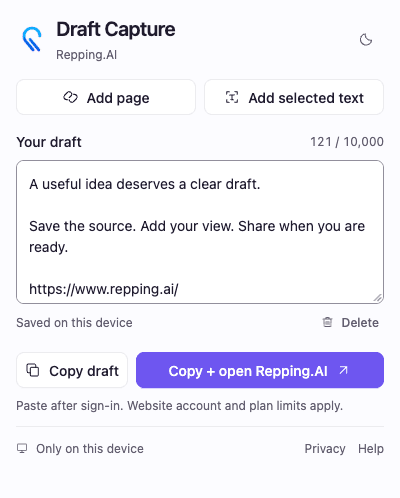
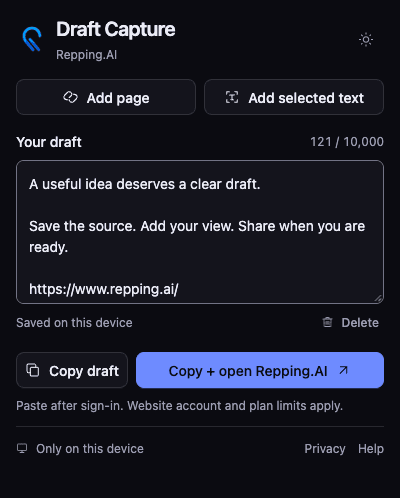
Turn a page or selected text into an editable draft. Keep it on this device, then copy it when you are ready.
Chrome Web Store publication is pending. A public installation link will appear here after release.
From a useful page to your next draft
01
Capture the useful part
Add a page title and source URL, or select text before opening the extension. Each capture adds to your draft.
02
Make it your own
Edit one draft on this device. The extension saves your text locally and remembers your theme.
03
Copy when you are ready
Copy into any application, or open Repping.AI, sign in, and paste into the composer.
Your draft stays on this device
Capture, edit, save, copy, and delete without an account. The extension has no analytics, advertising, or background page scanning.
- One local draft, up to 10,000 UTF-16 code units. Some emoji use more than one code unit.
- Capture removes URL queries and fragments. It does not support selected text in form fields or embedded frames.
- The extension never pastes, uploads, or publishes automatically. Website account and plan requirements still apply.
- Delete draft removes the saved extension text. Clipboard copies and website drafts remain separate.
Privacy, terms & support
The extension privacy policy explains local draft handling. The website policies explain what happens when you use Repping.AI.
Extension privacy policy
Page capture, local storage, retention, deletion, and clipboard use.
Website privacy policy
Account data and information you share after opening the website.
Terms of service
The existing Repping.AI terms for use of the service.
Cookie policy
Website cookies and your consent choices.
Extension help
Capture instructions, saved drafts, and recovery steps.
Contact support
Send a question or report a problem to the Repping.AI team.
Need help with Draft Capture?
Email support@repping.ai with your extension version, Chrome version, and the action that failed. Keep private draft text out of support requests.