Social Media Content Audit Template (Free)
Find What To Keep, Fix, Repurpose, And Retire
Use this free social media content audit template to review posts by goal, spot useful patterns, and turn the findings into next month's content calendar.
Quick download
Get the free social media content audit template
Download the worksheet now, jump to the template section, or preview the audit fields before reading the full guide.
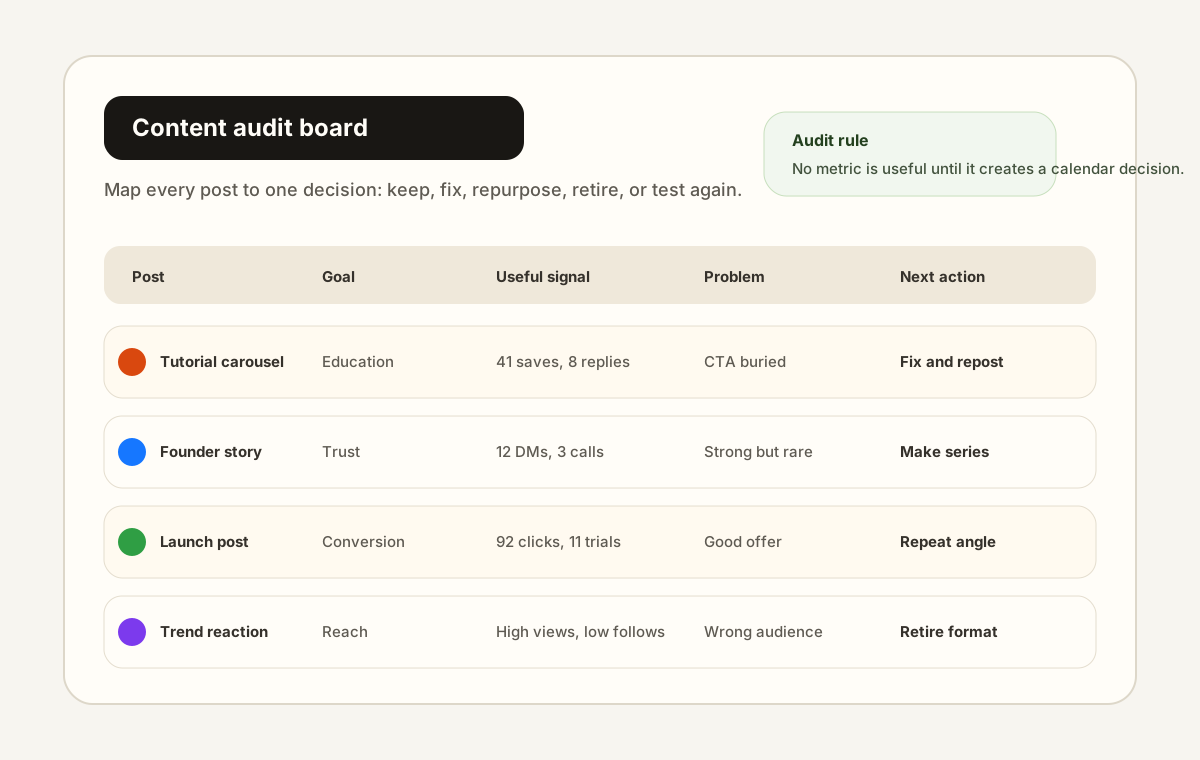
Start with a post inventory, not a dashboard screenshot
A social media content audit template should begin with a clean inventory of posts, not a pasted dashboard screenshot. The inventory gives every post a row, a goal, a format, a useful signal, a weak signal, and one decision. That structure keeps the audit focused on what should change next.
The mistake most teams make is reviewing content by raw performance first. High reach can hide weak audience fit, and a low-reach post can still create qualified replies, saves, clicks, or DMs. A useful content audit looks at what each post was supposed to do before it decides whether the post worked.
- List the post URL, platform, format, publish date, and owner.
- Tag the goal before looking at performance.
- Record one useful signal and one weak signal for each post.
- Copy the strongest audience phrase from comments, replies, DMs, or calls.
- End the row with one decision tag.
Separate content quality from channel fit
A post can be good content and still be wrong for a channel. That is why the audit needs separate notes for content quality and channel fit. Content quality asks whether the idea, proof, hook, structure, and CTA were clear. Channel fit asks whether the format matched how people behave on Instagram, LinkedIn, TikTok, YouTube, X, or another platform.
This distinction prevents the team from throwing away useful ideas too early. A dense educational post might fail as a short caption but work as a carousel, newsletter section, or LinkedIn document. A founder story might underperform on one platform but create high-trust DMs somewhere else.
- Mark whether the idea itself was useful before judging the platform result.
- Look for comments that say people understood the point, even if reach was low.
- Check whether the format matched the audience's expected behavior on that platform.
- Move strong ideas to a better format instead of deleting them from the system.
Collect audience language before writing next month's calendar
The most valuable part of a content audit is usually not the metric export. It is the audience language that shows what people noticed, misunderstood, wanted next, or were ready to buy. Copy exact phrases into the audit before summarizing them.
Those phrases make the next calendar sharper. They can become hooks, FAQ posts, offer objections, product education, launch emails, carousel slides, and video intros. They also help you avoid generic AI-sounding content because the next post begins with real audience wording.
- Copy at least five exact phrases from comments, DMs, replies, or sales calls.
- Mark whether each phrase is a question, objection, desire, proof point, or confusion signal.
- Turn repeated questions into educational posts.
- Turn repeated objections into trust-building content.
- Turn repeated desires into stronger CTAs and launch angles.
Turn this audit into a workflow
Repping.AI helps make the social media content audit operational. Keep decisions can become saved templates. Fix decisions can become rewritten captions or hooks. Repurpose decisions can become platform-specific drafts. Test-again decisions can become scheduled experiments with the success signal attached.
The point is to close the loop between review and publishing. If the audit lives in a spreadsheet and the calendar lives somewhere else, the team has to manually remember every decision. A better workflow keeps audit notes, draft rewrites, approvals, and scheduled posts connected.
For a solo creator, that means one monthly review can supply a large part of next month's posting plan. For an agency or small team, it means the strategist can hand writers and schedulers specific decisions instead of vague feedback like post more of what works.
The sample chart and data table here are a transparent starter framework, not a proprietary benchmark study. Replace the sample rows with your own post exports, comments, replies, DMs, click data, and calendar changes once you have enough history.
Workflow visuals
An original Repping.AI product-style mockup showing how a content audit turns post inventory into keep, fix, repurpose, retire, and test-again decisions.
Image: Original Repping.AI product-style mockup
Charts and examples
Sample audit decision mix by content outcome
This original chart shows how a practical social media content audit should create a balanced set of decisions instead of treating every post as either a winner or a failure.
Illustrative example, not measured customer results.
Turn into a platform-specific draft, email, carousel, or short video.
Rewrite the hook, CTA, structure, or publishing slot.
Add to the repeatable content system.
Stop spending calendar space on it for now.
Run one controlled experiment before deciding.
Source: Repping.AI sample content audit framework, July 2026
Reference tables
Content audit fields that create useful decisions
Use these fields as the original data structure for a monthly social media content audit. Each row explains what to collect and what the field should change.
| Audit field | What to record | Decision it should create |
|---|---|---|
| Goal | Awareness, education, trust, engagement, conversion, or retention | Compare posts against the job they were supposed to do |
| Useful signal | Saves, replies, shares, clicks, DMs, watch time, qualified comments, or signups | Decide whether the idea deserves more calendar space |
| Weak signal | Low completion, weak hook retention, few profile actions, no clicks, or poor audience fit | Choose the part to fix before reposting |
| Audience language | Exact phrases from comments, DMs, replies, or sales calls | Create sharper hooks, FAQs, and offer copy |
| Decision tag | Keep, fix, repurpose, retire, or test again | Turn the audit into next month's publishing plan |
Source: Original Repping.AI content audit worksheet
GIF demonstrations
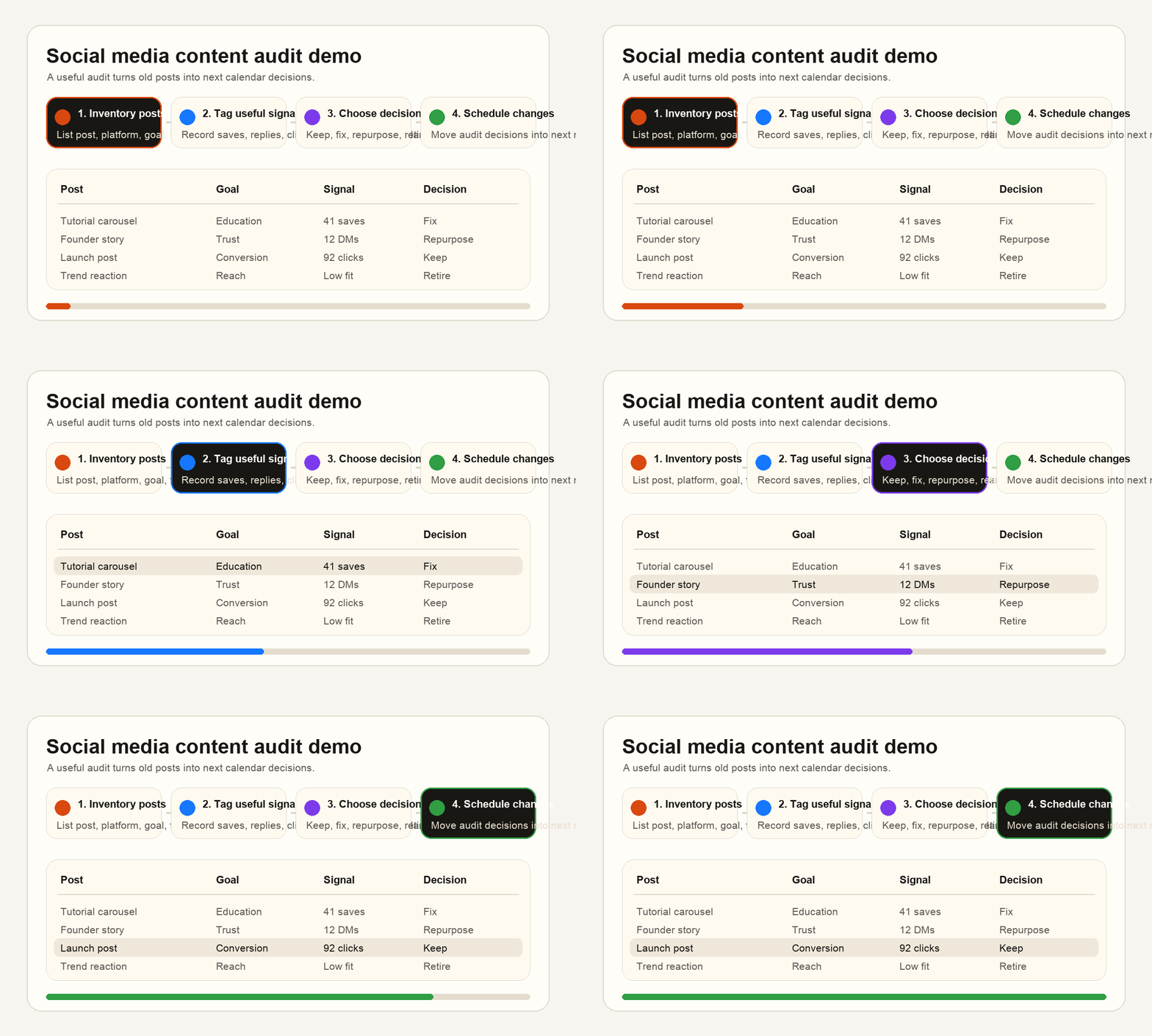
A short original workflow demo showing a monthly audit moving from post inventory to pattern notes, decision tags, and scheduled calendar changes.
Interactive tool
Content audit readiness scorecard
Check the boxes before you call the audit finished. A useful audit should change the content calendar, not just describe past performance.
Downloadable template
Download the social media content audit template
Use the markdown worksheet to inventory posts, tag decisions, collect audience language, and convert the audit into next month's calendar changes.
Download templateFrequently asked questions
What should a social media content audit include?
It should include a post inventory, goal tags, useful signals, weak signals, audience language, decision tags, pattern notes, and specific calendar changes for the next month.
How often should creators run a content audit?
Most creators and small teams should run a light monthly audit and a deeper audit after a major launch, campaign, or positioning change.
What is the difference between a content audit and an analytics report?
An analytics report explains what happened during a period. A content audit goes further by deciding which ideas, formats, hooks, CTAs, and platform choices should be kept, fixed, repurposed, retired, or tested again.
Sources and references
Used to guide the article's emphasis on original information, clear sourcing, useful page experience, and content that helps a real audience.
Used as a market reference for why audits should review channels, performance, audience, and action steps rather than isolated metrics.
Used as a platform-specific reference for reviewing Page analytics when auditing LinkedIn content.
Related reading
Free weekly social media analytics report template for turning metrics, KPIs, and content review notes into next week's calendar.
A practical guide to creator product launch content plan, with workflow advice, product context, and next steps for creators using Repping.AI.
A practical guide to social media approval workflow, with workflow advice, product context, and next steps for creators using Repping.AI.
Related product pages
Want the workflow, not just the advice?
Get the scheduler, AI drafting, approvals, and reporting context in one workspace so these playbooks are easier to run in practice.
No credit card required.
Used by
Plan, create, and schedule it all in one place
Repping.AI brings multi-platform scheduling, AI-assisted creation, and team collaboration into a single workflow.
Start free