Weekly Social Media Analytics Report Template (Free)
Turn Analytics Into Next Week's Content Calendar
Use this free weekly social media report template to turn analytics, KPIs, audience comments, and content review notes into next week's content calendar.
Quick download
Get the free weekly social media report template
Download the worksheet now, jump to the template section, or preview the report fields before you scroll through the full guide.
End the weekly content review with calendar changes
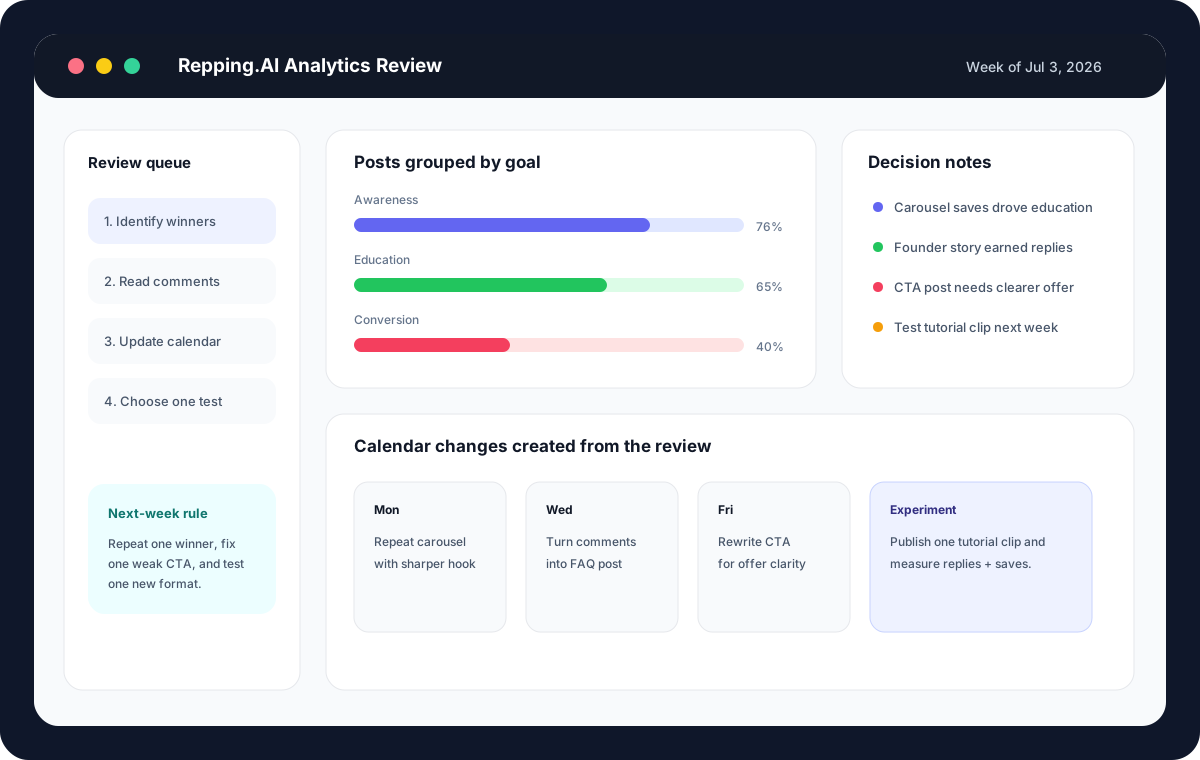
The final section of the report should be the next week's calendar change log. This is where the weekly content review becomes useful. Name the post to repeat, the topic to expand, the CTA to rewrite, and the experiment to schedule.
Keep the change log small. A weekly analytics routine should create a few confident moves, not a strategy reset every Friday. Small adjustments compound because the team can actually ship them.
- Add one repeat post to the calendar before the meeting ends.
- Rewrite one weak CTA while the evidence is still fresh.
- Assign one follow-up post from audience questions.
- Schedule one experiment with a success signal.
- Archive one low-value format for now.
Turn this template into a workflow
Repping.AI helps make the social media analytics template operational. The same workspace can hold analytics notes, captions, approvals, and scheduled posts, so the review does not live in a separate document that everyone forgets by Monday.
For a solo creator, that means the weekly social media report becomes a planning ritual instead of a reporting chore. For a team, it means the person reviewing performance can pass clear tasks to the person writing, approving, or scheduling the next post.
The sample chart and data table here are a transparent starter framework, not a proprietary benchmark study. Once you have enough history, replace the sample rows with your own post exports, weekly content review notes, and social media dashboard data.
The strongest weekly workflow is simple: review useful signals, copy audience language, choose calendar changes, and schedule the next test. That is how a report becomes a content system.
Original screenshots
An original Repping.AI product-style mockup showing how a weekly review connects performance groups, decision notes, and the next publishing calendar.
Image: Original Repping.AI product-style mockup
Original charts
Sample decision weight by post goal
This original chart shows how a weekly review should weight signals differently by goal instead of ranking every post by reach alone.
Best signal when the goal is usefulness
Best signal when the goal is relationship depth
Useful, but not enough by itself
Needs lower volume but stronger intent
Source: Repping.AI sample weekly review framework, July 2026
Original data
Weekly report fields that lead to action
Use these fields as the original data structure for a practical weekly social media report. Each row maps a metric group to the decision it should create.
| Report field | Useful signal | Decision it should create |
|---|---|---|
| Goal | Awareness, education, trust, engagement, or conversion | Compare posts only against similar jobs |
| Best post | Highest useful signal inside the goal group | Repeat the format with a new angle |
| Weak post | Good idea with low saves, replies, clicks, or completion | Rewrite hook, structure, timing, or CTA |
| Audience language | Repeated words from comments, replies, or DMs | Add phrases to captions, FAQs, and offer copy |
| Next experiment | One assumption worth testing | Schedule one measurable test in next week's calendar |
Source: Original Repping.AI weekly reporting template
GIF demonstrations
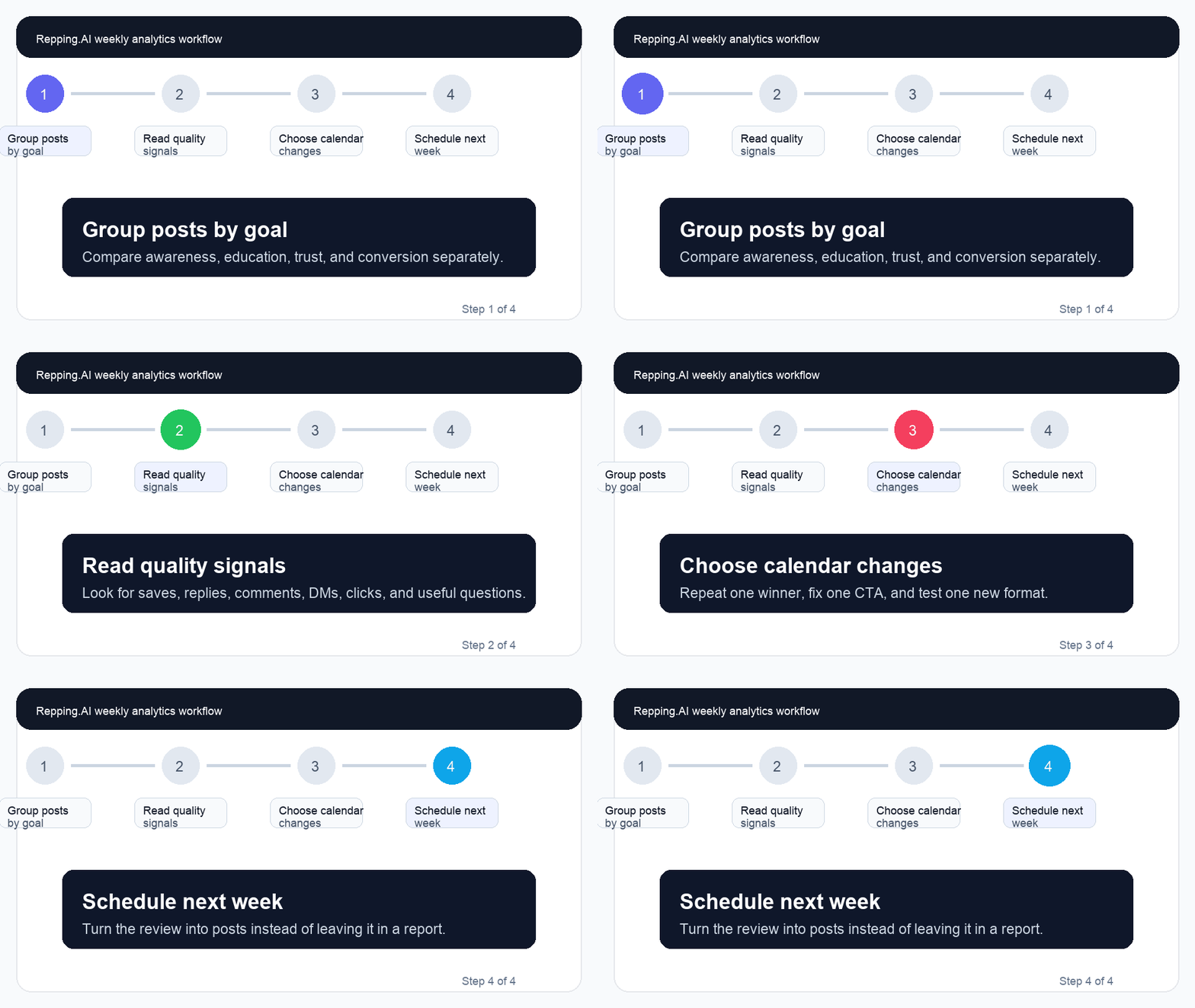
A short original GIF demonstration of the four-step review flow: group posts by goal, read quality signals, choose changes, and schedule next week.
Interactive tool
Weekly analytics readiness scorecard
Check the boxes before you call the report finished. A useful report should end with calendar changes, not a screenshot of numbers.
Downloadable template
Download the weekly analytics review template
Use the markdown worksheet to run the review with your team, collect audience language, and convert the result into next week's calendar.
Download templateFrequently asked questions
What should a weekly social media analytics report include?
It should include posts grouped by goal, useful success signals, social media KPI notes, audience language from comments or DMs, one repeat decision, one fix decision, one stop decision, and one experiment for next week.
How long should a weekly social media report take?
For most creators and small teams, 30 to 45 minutes is enough. The point is not to inspect every metric in the social media dashboard template; it is to make calendar decisions from the strongest signals.
Which metrics matter most in a weekly marketing report?
The best metrics depend on the post goal. Reach and shares matter for awareness, saves and completions for education, replies and DMs for trust, and clicks or bookings for conversion.
Sources and references
Used to guide the article's emphasis on original information, clear sourcing, and a useful page experience.
Used for metric categories such as reach, impressions, engagement, conversions, and ROI reporting context.
Used as a platform-specific reference for reviewing LinkedIn Page analytics.
Related reading
Social Media Content Audit Template (Free): what to know, what to compare, and how Repping.AI helps teams turn the advice into scheduled content.
A practical guide to creator product launch content plan, with workflow advice, product context, and next steps for creators using Repping.AI.
A practical guide to social media approval workflow, with workflow advice, product context, and next steps for creators using Repping.AI.
Related product pages
Used by
Turn this template into a workflow
Use Repping.AI to connect the weekly social media report, caption edits, approvals, KPI notes, experiments, and publishing calendar so the review changes what you post next week.
Build the analytics workflow